What is a Geth node and how to run one

Written by Alchemy
Intro to Geth and nodes
Ethereum nodes are computers that are part of the Ethereum blockchain network. These nodes are real computers that run software that checks, stores, and sometimes makes blocks.
"Client" is the name of the actual software. It lets us interact with the blockchain through a JSON-RPC API, read and verify the blockchain, and read or write to smart-contracts.
Geth is one of these clients and one of the most popular ones to use. It's written in the Go programming language and kept up to date by a group of people who work for the Ethereum Foundation and other people who help.
Some characteristics of Geth:
- It comes with a JavaScript console that you can run with "geth console."
- The client can work with other JavaScript clients (web3js).
- Sepolia and other testnets are built in (or build your own private Ethereum network)
- It is usually thought of as the standard for other Ethereum nodes.
In this latest Alchemy blog, we'll learn how to install and run a Geth node.
Networks (Mainnet vs testnet) and Geth
To understand Geth nodes, we’ll need to understand different networks of Ethereum.
Ethereum features a single core network (Mainnet) where all transactions take place, but it also makes use of a number of other testing networks that have been set up to test things out (Testnet). Consider using these "play" blockchains to experiment with blockchain capabilities outside of your localhost.
1. Mainnet
The Ethereum mainnet is the network used to generate Ethereum. ETH may be mined or traded on exchanges, and it is always available.
2. Sepolia
Sepolia is the Ethereum testnet Geth developers should use today. It is a proof-of-stake network maintained by Ethereum core developers, and older testnets such as Ropsten, Rinkeby, Kovan, Goerli, and Kiln have been deprecated.
To start building on Sepolia, get Sepolia ETH from a faucet.
What is a Geth node?
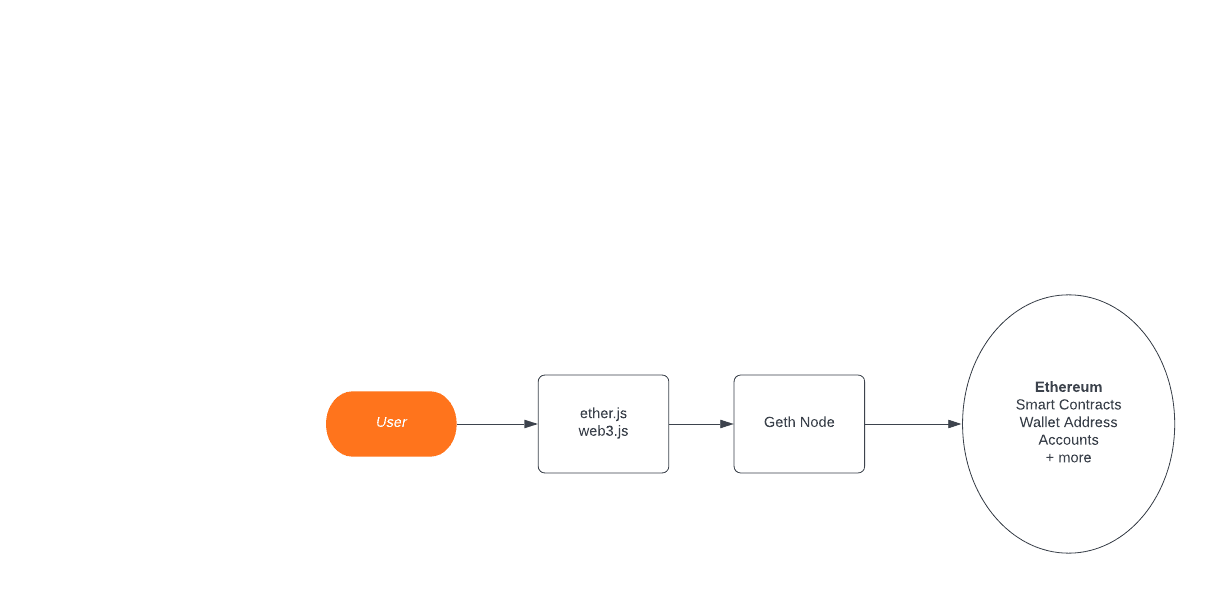
With Geth, you can establish your own private Ethereum network. The blockchain of an Ethereum network begins with a root block known as the genesis block. There are no transactions in the genesis block.
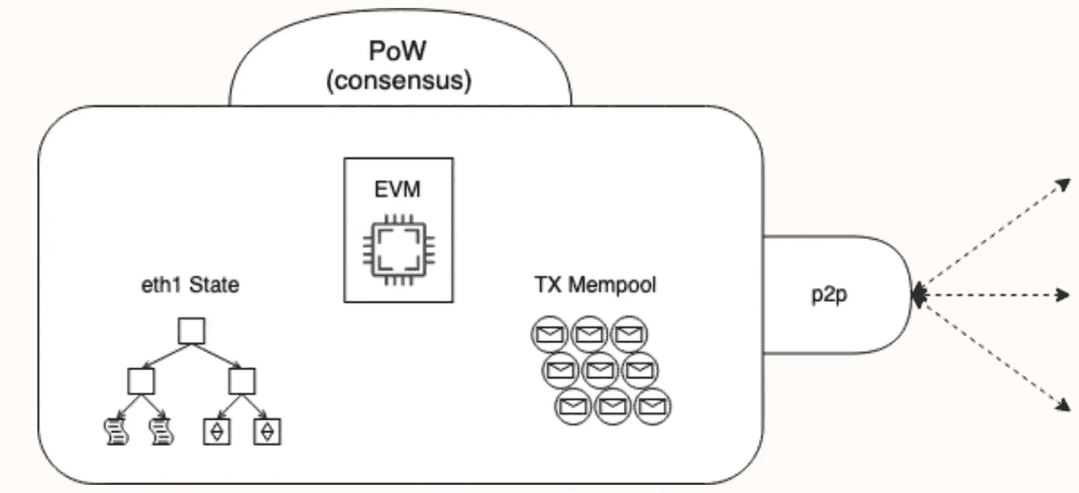
There are different sorts of Ethereum nodes, but Geth nodes are divided into three categories: light nodes, full nodes, and archive nodes.
Light nodes
Since they don’t validate every block, light nodes do not hold a copy of the Ethereum blockchain. As a result, they rely on data from full nodes. Running light nodes has several advantages, including faster startup, lower storage use, and fewer computational/memory needs. Light nodes have a lesser level of trust and many times rely on full nodes, which can be problematic.
Light nodes:
- Store the header chain and request everything else.
- Verify the validity of the data against the state roots in the block headers.
- Provide a use for low capacity devices, such as embedded devices or mobile phones, which can't afford to store gigabytes of blockchain data.
Full nodes
Full nodes verify that the transactions in the blocks follow the standards outlined in the Ethereum Yellow Paper. They do this to guarantee that the blocks transferred over the network are genuine. You can have faith in their efforts. This verification technique is used by complete nodes to keep the network in line with Ethereum's requirements.
Full nodes:
- Store full blockchain data.
- Participate in block validation and verify all blocks and states.
- Derive all states.
- Serve the network and provide data on request.
Archive nodes
An archive node is a node that saves the entire transaction history. The wellness and structure of the network is dependent on these nodes.
Archive Nodes:
- Store everything kept in the full node and build an archive of historical states. This is needed if you want to query account balances or any on-chain data, or simply and reliably test your own transactions set without mining them using OpenEthereum.
- Provide data that represents units of terabytes. This makes them less attractive for average users but makes them handy for services like block explorers, wallet vendors, and chain analytics.
Requirements for installing Geth
- Multi-core CPU (7GB+ of RAM)
- Local SSD drive with at ~600GB+ of free space
- OPTIONAL Use 16/32 GB+ CPU for optimized performance by caching. By using caching features (aka using the ‘--cache’ flag), Geth will be able to get the state from memory instead of your hard drive.
- Homebrew for Mac users
- PPA for Linux/Ubuntu
- OPTIONAL Parity (for more information, learn how to migrate from parity to Geth)
Geth installation methods
You can install Geth via packet manager, via homebrew on MacOS or PPA on Ubuntu, directly download it, run it in a docker, or even build it from scratch.
Homebrew using MacOS terminal:
$ brew tap ethereum/ethereum
$ brew install ethereum
Check out a list of different helpful commands here (abigen, bootnode, checkpoint-admin, clef, devp2p, ethkey, evm, faucet, geth, etc.) or you can also run:
$ geth --helpPPA for linux/ubuntu:
$ sudo add-apt-repository -y ppa:ethereum/ethereumInstall the stable version of go-Ethereum:
$ sudo apt-get update
$ sudo apt-get install ethereum
Docker:
Download Docker from here. Then run the following:
$ docker pull ethereum/client-go:latestAnd then run:
$ docker run ethereum/client-go:latestRun Geth
Run this command in a terminal at the location where we unzipped the Geth folder/root folder so that we can run it:
$ ./Geth console --testnet --syncmode "light" --rpc --rpcaddr "localhost" --rpcport "8485" --rpccorsdomain "*" --rpcapi="db,eth,net,web3,personal"This will right away take us to the Geth console.
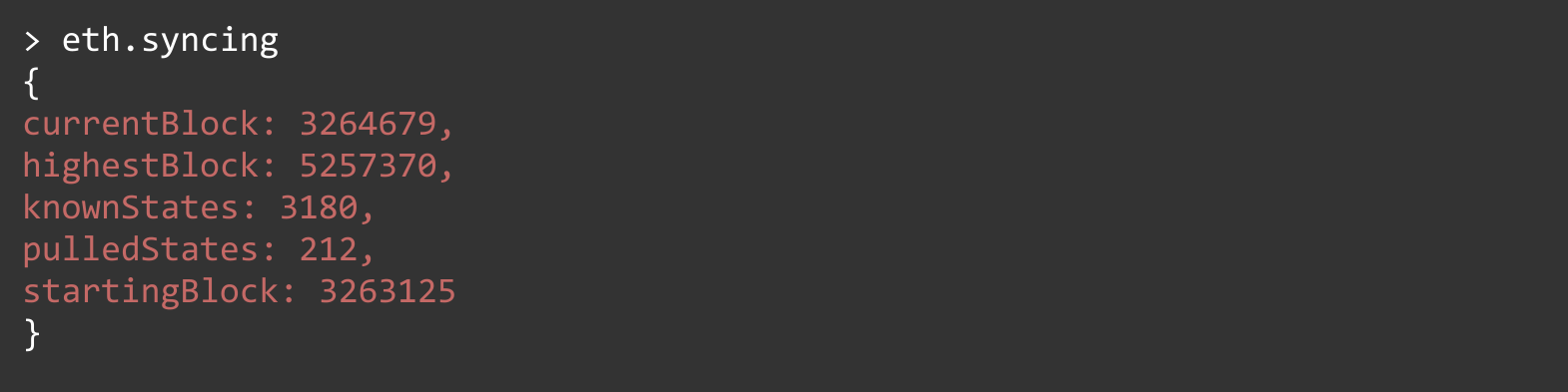
By typing net, we can see if we have any peers. By typing eth.syncing, we can see if the node is currently syncing. It is possible that your node will not begin synchronizing until you restart it.
For example, running eth.syncing will output the following sample query:
Final thoughts
Geth is often already included in the majority of web/extension wallets accessible for consumer adoption (MetaMask, Coinbase, Rainbow, etc).
But, installing and running Geth is well worth the effort if you want to experiment with mining or develop your own custom Ethereum software. It’s also useful if you simply want to control your own node and your wallet's key (signing your own transactions rather than relying on third-party software). Using Geth, you can now open up a whole world of Ethereum development!
Related Overviews
 Infra
InfraOctober 26, 2026
Best Hyperliquid RPC providers in 2026: HyperEVM and HyperCore compared
Compare ten Hyperliquid providers on HyperEVM RPC, HyperCore streaming, and node peering, and see which one fits your build, from trading bots to HyperEVM apps.
 Infra
InfraOctober 17, 2026
Public, private, and dedicated RPC endpoints, explained
"Private RPC" can mean a keyed endpoint, private transaction routing, or single-tenant nodes. What each one is, how they fit together, and which one your workload needs.
 Infra
InfraOctober 16, 2026
Amazon Managed Blockchain alternative: how to migrate AMB Access and AMB Query to Alchemy
Amazon Managed Blockchain (AMB) shuts down September 29, 2027. Move AMB Access and AMB Query to Alchemy with the same JSON-RPC calls and a blockchain data API.

Build blockchain magic
Alchemy combines the most powerful web3 developer products and tools with resources, community and legendary support.